
Content Generation and Management for Lexis Yoga
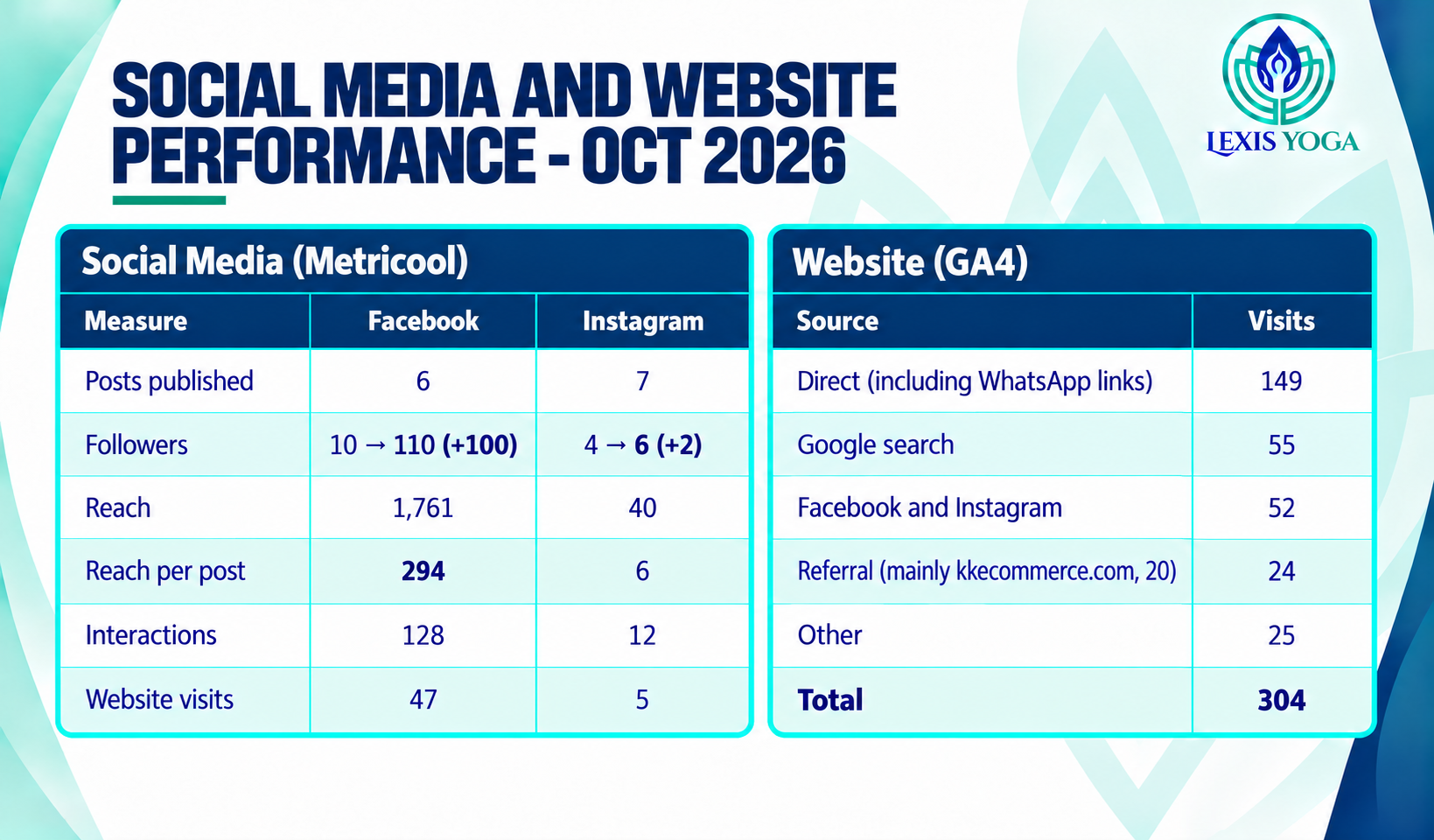
October Progress (Our First Month)
We started tracking on 11 Oct 2026, so this is really three weeks of data, not a full month.
Progress
We published 13 posts (6 on Facebook, 7 on Instagram), got 304 website visits, and the full AI pipeline — content creation, scheduling and tracking — is now running end to end.
Strength
Facebook took off: followers went from 10 to 110, with 1,761 reach and 128 interactions from just 6 posts. Our biggest traffic source was direct visits, likely people we already know reaching out through WhatsApp.
Weakness
Instagram barely moved: 7 posts, only 40 reach, and +2 followers. Same effort, no traction, so something needs fixing, not just more time. We’re also close to Metricool’s free-plan limit of 20 posts a month.
Opportunity
Find out what’s wrong with Instagram before repeating the same approach. Do more of whatever worked on Facebook. Separate WhatsApp clicks from direct traffic so we know what’s really organic. And keep building this project page — it’s already sending real visitors to Lexis Yoga.
How AI is used in this project
a) Content creation by ChatGPT with Kling
For Lexis Yoga, ChatGPT handles the whole process from product photo to finished video. We upload real product photos with a short brief, such as a yoga pose on the Pink & Silver mat. ChatGPT then creates the product images and adjusts the background, lighting and composition. We check each shot to make sure it looks good and the branding is accurate.
These images become visual references for Kling. ChatGPT writes a detailed prompt for each shot, covering the action, camera movement, lighting and pacing. Kling generates the clips. If something comes back wrong, usually a movement or a product detail, ChatGPT rewrites the prompt.
Once the clips are right, ChatGPT joins them into a finished video. It adds transitions, captions, the website address and background music. It also writes the social media copy. One product idea becomes images, a video and a set of posts for Lexis Yoga’s channels.
b) Content creation by Claude with Kling
For Lexis Yoga product videos, Claude now does more than write prompts. Kling is connected to Claude, so the whole job happens in one chat window. There’s no more copying prompts between two browser tabs.
The process still starts with real product photos and a short brief. For example, the Lexis Yoga character slowly unrolls the Pink & Silver Mandala mat in a bright studio while the camera moves in on the laser hot-stamped design. Claude uploads the photos to Kling and writes shot-by-shot prompts. Each prompt covers camera movement, lighting, background, pacing and how the product should look. Claude also picks the model and settings. It keeps the details consistent, so the mat doesn’t change colour halfway through the video.
The Lexis Yoga character and the mats can be saved as subjects in Kling’s Elements library. This keeps them looking the same from one video to the next. Real photos and reference clips work better than long lists of typed rules, so the prompts rely on them. When a reference yoga-pose clip is available, Kling’s Motion Control is used.
Before each generation, Claude checks the credit balance and states the cost. It’s a useful brake on the urge to make “just one more version”. Claude then tracks the job and returns the finished clip in the same chat. If a clip comes back wrong, the problem is described to Claude. It rewrites the prompt and generates the clip again.
The finished clips are still joined together in CapCut with smooth transitions. That part remains a human job, at least for now.
c) Post scheduling by Claude with Metricool
Lexis Yoga’s Facebook and Instagram posts are planned in a “Content Calendar” tab. It sits inside the FB and Insta Posting Table. Each post has its image or video, hook and date. The media is stored in a “Social Post Plan” Drive folder, sorted by month.
Claude reads the calendar and pulls the matching files from Drive. It writes or polishes the captions. Then it schedules everything straight into Metricool through the connector, so there’s no need to open Metricool at all. The account is on Metricool’s free plan, which allows 20 scheduled posts a month. That’s the working limit for now.
For tracking, Claude pulls post and account analytics from Metricool into the “Lexis Yoga – Project 1 KPI Tracker” Google Sheet. The sheet has weekly and monthly tabs. A KPI review happens on the 28th of each month in the Sales To-Do List doc. It shows what worked and helps adjust the next month’s calendar.
In short: the human decides what to post, Claude does the clicking, and Metricool does the posting and the counting.
d) Claude with Google Analytics for webstore KPI tracking
Claude reaches Google Analytics through the Claude in Chrome extension. The extension works inside the user’s own Chrome browser and shares its existing sign-ins. The Google account only needs to be logged in already. Claude never types a password.
When asked, Claude opens a new tab and goes to analytics.google.com. The first time it visits, it asks for permission. It then opens the GA4 property for the webstore and sets the date range. It reads the reports on screen: visitors, traffic sources, add-to-carts and purchases. Claude puts those numbers together into a summary or a KPI dashboard. Every step is visible in the browser as it happens.